Adding Logos and Photos to Blank Plastic Cards Easily
Table of Contents []
- Adding Logos and Photos to Blank Plastic Cards with Plastic Card ID
- Design Fundamentals for Logos and Photos on Plastic Cards
- Types of Blank Cards That Support Logo and Photo Printing
- In-House Card Printing vs. Pre-Printed Cards: A Strategic Choice
- Card Programs That Benefit Most from Logo and Photo Printing
- Frequently Asked Questions About Adding Logos and Photos to Plastic Cards
- Get Started with Plastic Card ID Today
Adding Logos and Photos to Blank Plastic Cards with Plastic Card ID
There is something immediate and powerful about holding a card that carries your brand. Not a paper certificate, not a printed receipt - a real, rigid plastic card with your logo centered cleanly, your colors accurate, your photo ID sharp and professional. That combination of tactile quality and visual identity is exactly what CPE helps businesses and organizations achieve every single day.
Adding logos and photos to blank plastic cards transforms a commodity item into a branded tool. Employee badges gain authority. Loyalty cards earn wallet space. Membership cards signal legitimacy in a way that no paper alternative can replicate. Whether you are running a card program for 50 employees or managing an event credential rollout for 10,000 attendees, understanding how to print on blank plastic cards - and doing it well - changes what your program can accomplish.
This guide covers everything from choosing the right blank card stock to printing vivid logos and high-resolution photos that hold up through daily use. If you want cards that look professional from day one and stay that way, you are in the right place.
Why Blank CR80 Cards Are the Starting Point
The CR80 format - 3.375 inches by 2.125 inches, 30 mil thick - is the ISO 7810 standard and the universal baseline for plastic card programs worldwide. Blank CR80 cards are the same dimensions as a standard credit card, which means they fit wallets, badge holders, card readers, and printers without any modification. Starting with a quality blank card means your logo and photo printing has a clean, consistent substrate every time.
CPE stocks blank PVC cards in standard white, as well as clear, frosted, and a range of pre-colored options. Each card surface accepts card printer ink transfer cleanly, producing sharp edges on logos and true skin tones in photos when the right ribbon and printer combination is used. The quality of the blank card itself directly affects print quality - which is why sourcing from an experienced supplier matters more than most buyers initially realize.
The Difference Between Print-Ready and Pre-Printed Cards
When you add logos and photos yourself using an in-house card printer, you retain total design control. You can update the template on a Tuesday morning and print new cards by afternoon. Staff photos change, logos refresh, seasonal campaigns launch - in-house printing accommodates all of it without minimum order delays or reprinting fees. Blank cards give you that flexibility at a lower per-card cost over time.
Pre-printed cards, by contrast, are ideal when design is fixed and volume is high. Large loyalty card rollouts or membership campaigns with a locked design often benefit from bulk pre-printing. Plastic Card ID supports both approaches, and many clients use a combination: pre-printed card bodies with variable data - names, photos, barcodes - added at the point of printing. Understanding which model fits your program is the first real decision in any card project.
Card Printer Selection and Its Impact on Logo Quality
Not all card printers reproduce logos equally. Entry-level single-sided printers handle basic text and simple graphics well. For full-color photo ID cards or logo-rich designs with gradients and precise brand colors, a printer with a high-resolution dye-sublimation engine is the right tool. CPE carries card printers from Evolis, Zebra, and Fargo - three brands that represent the professional standard across industries.
Ribbon selection matters too. A YMCKO ribbon (yellow, magenta, cyan, black, overlay) delivers full-color printing plus a protective topcoat that resists scratching and UV fading. For cards that carry photos alongside logos, this ribbon type is the workhorse choice. Single-color ribbons work beautifully for simple logo-only badges at a lower cost per card. Matching ribbon to purpose is part of what separates a functioning card program from an optimized one.
| Card Type | Best Use for Logo/Photo Printing | Recommended Ribbon | Ideal Program |
|---|---|---|---|
| Blank White PVC CR80 | Full-color logos, employee photos, ID cards | YMCKO | Badge programs, membership, loyalty |
| Blank Clear PVC | Frosted logo effect, transparent design overlay | YMCKO or KO | Premium membership, VIP access |
| Colored Stock Cards | Single-color logo over colored base | K (monochrome) | Event credentials, staff badges |
| Magnetic Stripe HiCo | Logo encoded data, photo ID | YMCKO | Access control, hotel key, loyalty |
| Smart Chip / RFID Cards | Logo contactless credential | YMCKO | Secure access, event management |
Design Fundamentals for Logos and Photos on Plastic Cards
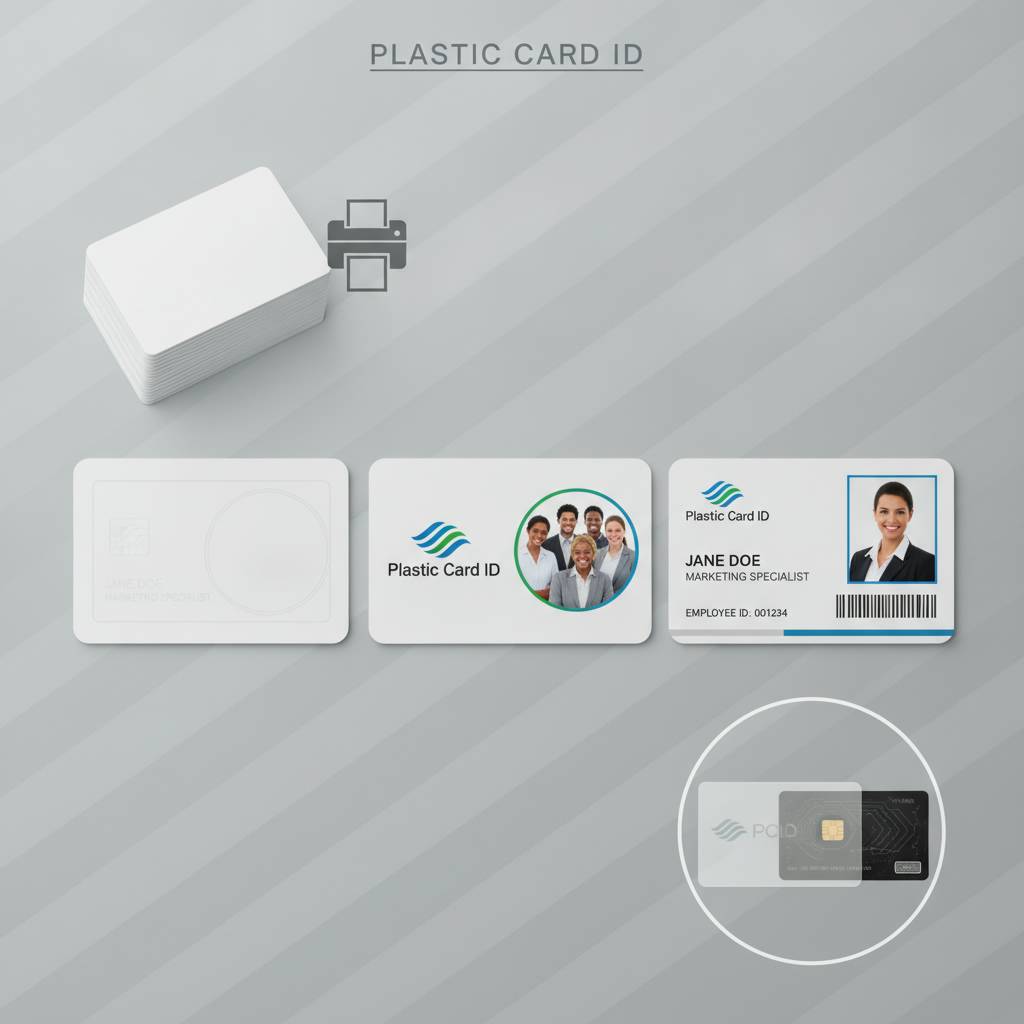 Printing well starts long before the card hits the printer. Design decisions made in software - resolution, color mode, bleed settings, image quality - determine whether your logo prints crisp or blurry, whether your employee photo looks professional or washed out. Getting these fundamentals right is the difference between a card program that builds brand equity and one that quietly undermines it.
Many first-time card program managers underestimate the importance of this phase. They assume the printer will handle it. In reality, a card printer is only as good as the file it receives. Investing 30 minutes in proper file preparation saves hours of reprints and eliminates the frustration of inconsistent output across a card run.
Resolution Requirements for Logo Printing
Logos destined for plastic cards should be prepared at a minimum of 300 DPI at print size. Vector formats (SVG, EPS, AI) are ideal because they scale without quality loss - your logo at badge size looks just as sharp as it would on a billboard. If you only have a raster version of your logo, ensure it is high resolution before printing. A logo pulled from a website at 72 DPI will print with visible pixelation on a professional card printer.
Color mode matters significantly. Card printers work in RGB, not CMYK, so your design files should use RGB color space. If your brand has specific Pantone colors, convert them to their closest RGB equivalents and run a test print before committing to a full card run. Accurate brand color reproduction builds recognition - even a small shift in your primary brand color can feel off to customers who see your cards regularly.
Photo Standards for Professional ID Cards
Employee and member photos on plastic cards need to meet basic quality standards: consistent background color (typically white or light gray), proper lighting that eliminates harsh shadows, and a resolution of at least 300 DPI at the printed photo size. A photo taken under fluorescent office lighting with a modern smartphone will generally print well; a photo cropped from a group shot taken at an office party will not.
Establishing a simple photo capture workflow pays long-term dividends. A fixed backdrop, a consistent camera-to-subject distance, and even basic guidance for employees about attire and expression creates a cohesive visual identity across all cards. Consistency in photo style signals organizational professionalism - visitors, clients, and security personnel all respond to cards that look like they were intentionally designed, not assembled from random sources.
Layout Best Practices for Card Design
The standard CR80 card is small, which means every design element must earn its space. Logos should be placed prominently but not so large that they crowd out essential information. Photos, where required, typically occupy the left third of the card with text information running alongside. Overcrowding a card design is one of the most common mistakes - when in doubt, remove an element rather than shrink everything to fit.
Leave a minimum 1/8-inch safe margin from card edges for all critical content. Card printers have slight mechanical tolerances, and content placed too close to the edge risks being clipped. Background designs that intentionally extend to the edge should include bleed area in the design file. A clean layout with intentional white space communicates confidence and gives your logo room to breathe and register visually with the cardholder.
Types of Blank Cards That Support Logo and Photo Printing
Choosing the right blank card substrate is not just a technical decision - it is a branding decision. The same logo printed on a standard white PVC card, a frosted card, and a clear card produces three distinctly different visual effects. Each has its place, and understanding those differences helps you match card type to program purpose in a way that serves both function and first impression.
CPE maintains a broad catalog specifically to give clients this flexibility. Whether the goal is a sleek, modern access card or a warm, approachable loyalty card, the substrate choice shapes how the printed logo and photo read in the hand of the recipient.
Standard White PVC Cards
White PVC cards are the most versatile substrate for logo and photo printing. They provide the highest contrast for full-color designs, produce accurate color reproduction, and accept both dye-sublimation and direct-to-card printing without issue. For employee ID cards, photo badges, loyalty cards, and membership cards, white PVC is the default choice for good reason - it simply works reliably across every design style and card program type.
These cards are available in 30 mil CR80 (standard wallet thickness), as well as thinner overlaminates and combo card configurations. Standard white PVC delivers maximum print quality at the most accessible price point, making it the backbone of card programs ranging from small nonprofits to national retail chains. When uncertain about substrate, start here.
Clear and Frosted Cards for Premium Visual Impact
Clear PVC cards create a striking visual effect when logos are printed directly onto the transparent surface - especially with white or light-colored inks. Frosted cards offer a translucent, soft-focus appearance that feels distinctly premium in hand. Both options photograph beautifully and tend to generate positive reactions from recipients who are accustomed to standard plastic cards. For VIP membership programs, upscale loyalty cards, or executive ID credentials, clear and frosted substrates signal something above the ordinary.
Printing on clear and frosted cards requires some design adaptation. Because the background is transparent rather than white, designs must account for how colors will read without an opaque base. White ink underlays, used strategically, restore vibrancy to color logos printed on clear stock. Plastic Card ID can advise on the right card and printer configuration for this type of output.
Colored Stock, HiCo Magnetic Stripe, and Smart Chip Options
- Pre-colored PVC cards allow logos and text to print over a consistent colored base, eliminating the need to flood-fill the card background with ink on every print run - reducing ribbon consumption and improving speed.
- HiCo magnetic stripe cards combine high-coercivity data encoding with full printable surfaces - your logo and cardholder photo print cleanly on the front while the stripe stores access credentials, loyalty points, or hotel key data on the back.
- LoCo magnetic stripe cards are appropriate for lower-security applications with shorter encoding distances, and they support identical print quality on the card face.
- RFID and proximity cards contain embedded chips or antennas but present a fully printable surface - logos, photos, and variable data print normally while the card functions as a contactless credential.
- Smart chip cards including MIFARE DESFire configurations support secure, encrypted contactless access and can carry full branded graphics on both card faces.
In-House Card Printing vs. Pre-Printed Cards: A Strategic Choice
 The decision to print cards in-house versus ordering pre-printed cards from a supplier is more strategic than it first appears. Both models have clear advantages. The right answer depends on your card volume, how frequently your design or data changes, how quickly you need cards, and what total cost per card looks like at your scale of operation.
In-house printing gives you speed and control that pre-printing cannot match. When a new employee starts on Monday, you print their badge Monday morning. When a loyalty customer presents their phone number and asks for a card, you hand it across the counter within minutes. That responsiveness has real business value that does not always show up in a per-card cost calculation but absolutely shows up in operational efficiency.
When In-House Printing Makes the Most Sense
Organizations that issue cards continuously - adding new employees, enrolling new members, registering event attendees in real time - benefit most from in-house card printing. The setup cost of a quality card printer is recovered quickly when you factor in rush fees, minimum order quantities, and shipping costs from external print runs. Programs with variable data (unique names, photos, ID numbers) almost always find in-house printing to be the economically superior model.
Card printers from Evolis, Zebra, and Fargo are designed for office environments and do not require specialized operation. Most professionals are printing their first card within an hour of unboxing. Plastic Card ID provides printers, ribbons, cleaning kits, and blank card stock together - everything needed to launch a card program without sourcing from multiple vendors.
When Pre-Printed Cards Win the Calculation
If your card design is fixed - same logo, same design, same information for every card - and you need large quantities, pre-printing achieves lower per-card costs and consistent output. Retail gift card programs, promotional card campaigns, and event credential runs with uniform design all fit this profile. Pre-printed cards are also the right choice when design complexity, special finishes, or specialty card types are beyond what a desktop card printer can produce.
Many CPE clients combine both approaches: pre-printed card bodies arrive with the logo and background design already applied, then variable data (employee names, photos, barcodes, encoded stripe data) is added in-house at the point of issuance. This hybrid model captures the cost advantage of volume printing while preserving the flexibility of in-house customization.
Total Cost Considerations When Choosing Your Model
Calculating true cost per card requires including all inputs: the card itself, the ribbon cost per print, printer amortization, labor time, and the cost of errors or reprints. A YMCKO ribbon that prints 250 full-color cards costs roughly the same per card as ordering pre-printed cards in moderate volume - but the in-house model delivers those cards immediately, on demand, without minimum quantities.
For organizations printing fewer than 200 cards per month, a compact single-sided printer with a reliable ribbon supply is typically the most cost-effective setup. For higher volumes, dual-sided printing with a higher-capacity ribbon and auto-feeder becomes the better investment. CPE will match you with the right configuration for your specific card volume and program requirements. Reach out at 800.835.7919 to talk through the numbers with someone who does this every day.
Card Programs That Benefit Most from Logo and Photo Printing
Across industries, the cards that do the most work are the ones that combine visual identity with functional data. A plain white card with a barcode gets scanned. A branded card with a crisp logo, accurate colors, and a professional photo gets noticed, kept, and used - and it carries your organization's identity everywhere the cardholder goes. That reach is why smart organizations invest in print quality.
The programs below represent the most common and highest-value applications for logo and photo printing on blank plastic cards, based on Plastic Card ID's 25 years and over 100,000 customers across the United States.
Employee ID and Access Control Badges
Employee ID cards are among the most visible representations of your organization's professionalism. A well-designed badge with your logo, the employee's photo, name, title, and department conveys organizational structure and security awareness at a glance. Visitors, clients, and colleagues form immediate impressions based on badge quality - and a professional card signals that your organization takes identity seriously.
When paired with magnetic stripe encoding or RFID technology, employee badges become access control credentials. The same card that identifies an employee visually also unlocks doors, logs attendance, or authorizes system access. Multi-function credentials reduce card wallet clutter and simplify administration while delivering a cohesive branded experience at every interaction point.
Loyalty and Membership Cards That Stay in Wallets
Retailers who switch from paper punch cards to branded plastic loyalty cards consistently report measurable sales increases - in many cases 35 to 50 percent improvement in program engagement. The reason is straightforward: a plastic card lives in the customer's wallet alongside their bank cards, where it generates passive brand impressions dozens of times per week. A paper punch card gets lost in a junk drawer within two weeks of issuance.
Your logo on a loyalty card is not just decoration - it is a recurring marketing impression at zero cost per view. Every time the cardholder opens their wallet, they see your brand. Every time they hand the card to a cashier, your brand is visible to both the employee and anyone nearby. A loyalty card is a mobile billboard with a wallet-sized footprint and a long service life.
Event Credentials, Casino Cards, and Hotel Key Cards
Event credentials printed with logos, event branding, and attendee photos create a cohesive experience that paper badges cannot match. For conferences, trade shows, private events, and VIP gatherings, a plastic credential signals that the event organizer invested in the attendee experience. Credentials also hold up physically through multi-day events in ways that paper lanyards simply do not.
Casino player cards, hotel key cards, and other specialty hospitality credentials combine logo printing with encoded functionality. A hotel key card printed with the property's logo and room number information functions as a branded touchpoint at every entry and exit. Casino player cards with attractive graphics and accurate brand colors improve the perceived value of loyalty programs. Plastic Card ID supplies all of these card types, with full support for in-house printing configurations that fit hospitality environments.
Frequently Asked Questions About Adding Logos and Photos to Plastic Cards
When businesses contact CPE about starting or upgrading a card program, certain questions come up repeatedly. The answers below reflect real-world card program experience across industries and card types - practical guidance that helps buyers make confident decisions without unnecessary back-and-forth.
What File Formats Work Best for Logo Printing on Cards?
Vector formats - EPS, AI, and SVG - are the preferred choice for logo artwork because they scale without any quality loss. If your logo exists only as a raster image (JPEG, PNG, TIFF), ensure it is at least 300 DPI at the actual print size on the card. Files prepared in RGB color mode will produce the most accurate color output from card printer ribbons, which use dye-sublimation technology and render in RGB rather than CMYK.
Most card design software - including the bundled design applications that come with Evolis, Zebra, and Fargo printers - accepts standard image formats and allows placement of logos, photos, text, and barcodes in a visual drag-and-drop interface. You do not need professional graphic design experience to produce clean, professional card output. What you do need is quality source files for your logo and photos.
Can Photos and Logos Be Added to Cards with Magnetic Stripes or Chips?
Yes, completely. Magnetic stripe cards and smart chip cards present fully printable surfaces - the stripe and chip functionality is embedded within or beneath the card body without affecting the printable area. YMCKO ribbons print full-color logos and photos across the entire front face of these cards. The stripe or chip is then encoded separately using the card printer's built-in encoding module or a dedicated encoder.
This is one of the most important practical points for buyers new to card programs: functional cards and branded cards are not competing priorities. A hotel key card can look just as polished as a plain loyalty card. An access control badge can carry an employee photo, department logo, and building access encoding simultaneously. Technology and design coexist on the same piece of plastic without compromise.
How Many Cards Can One Ribbon Print Before Replacement?
- Standard YMCKO ribbons for compact desktop card printers typically yield 200-300 full-color, double-sided prints per ribbon.
- Higher-capacity ribbons for mid-range and production printers extend yields to 500-750 full-color prints or more per ribbon cartridge.
- Monochrome (K-only) ribbons for single-color logo or text printing achieve significantly higher yields, often 1,000-1,500 cards per ribbon.
- Ribbon cost per card typically falls between $0.15-$0.45 for full-color output, depending on printer model and ribbon type.
- Cleaning kits, used regularly, extend ribbon life and print head longevity - Plastic Card ID recommends cleaning after every ribbon change as standard practice.
Get Started with Plastic Card ID Today
Adding logos and photos to blank plastic cards is not complicated - but it does require the right card stock, the right printer, and a supplier with the depth of experience to guide the process from the first order through a card program that scales with your organization. That is exactly what CPE delivers, backed by over 25 years of experience and more than 50 million cards supplied to businesses across every industry in the United States.
Whether you are printing 50 employee badges a month or running a national loyalty card rollout, the combination of quality blank cards, professional card printers, and a knowledgeable partner makes every card in your program a stronger brand asset. From clear and frosted specialty cards to HiCo magnetic stripe cards and RFID smart credentials, Plastic Card ID has the inventory and expertise to match every program requirement.
Ready to build a card program that reflects your organization's professionalism and keeps your brand in your customers' hands? Contact Plastic Card ID today at 800.835.7919 and speak with a card program specialist who will help you select the right blank cards, printers, and ribbons to produce logos and photos that make every card count.